


How to choose the bot's minutes
2 min readDuring the match or before the match, the ready-made windows, why up to 20 minutes is recommended and how the market changes the minutes.
In step 2 of the new bot builder, Minutes, you say when the bot can alert. In this guide you'll see the windows available, why 20 minutes at most is recommended and how the chosen market changes the minutes you can use.
During the match or before the match
During the match, the bot searches within a window of minutes and alerts when a match meets the conditions inside it. Before the match, there are no minutes: you choose between One alert per match or One list a day, at whatever time you like.
The named windows
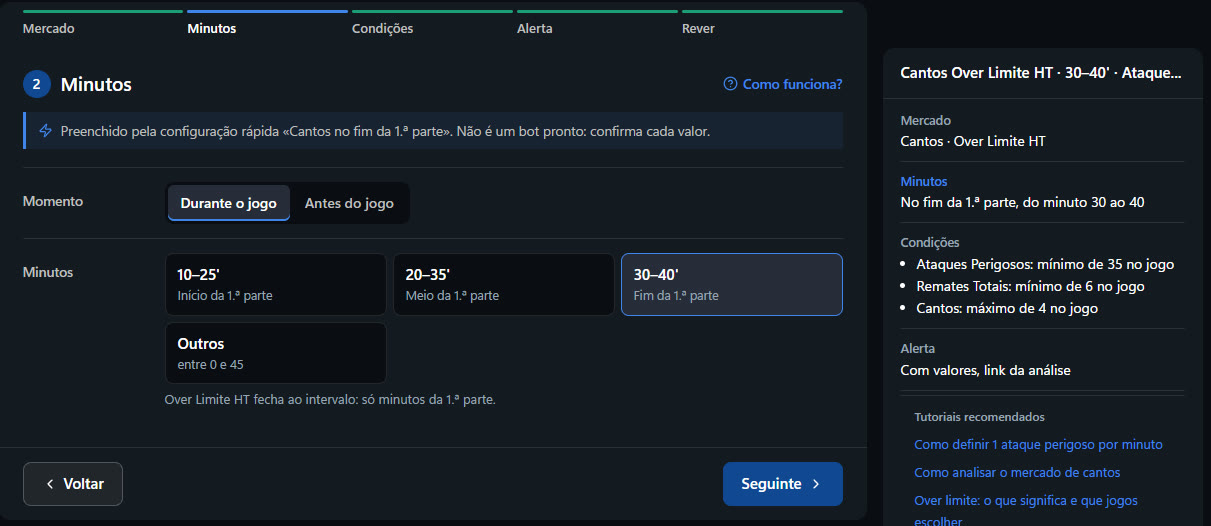
So you don't have to type minutes, there are ready-made windows, such as Start of the first half, Middle of the first half, End of the first half, Half time, Start of the second half, Middle of the second half and End of the match. If none of them suits you, open Others and type the start and end minute.
Recommended: up to 20 minutes
A short window forces the bot to say when the scenario happens. A “0 to 90” bot goes off in the first minute the numbers are met, and that is often too early. That's why we recommend a window of 20 minutes at most. If you type more, the builder still saves it, but shows a warning explaining why. You can read all about it in Bot minutes: why a short window works better.
The market decides the minutes
An HT (first half) market closes at half time, so it only accepts first-half minutes. For the second half, choose an FT market in step 1 and then the second-half minutes.
Bot minutes and stat minutes
The minutes in step 2 say when the bot can alert. Inside a stat, the Count only part of the match option says what is counted: for example, only the shots between minutes 30 and 40. They are different things and can be used together.
You chose the Over 0.5HT market. Which minute window makes sense?
Answer to mark this tutorial as done.